
Convert square product video to 4:5 without cropping the product

Take square product video to 4:5 with your whole product in view. AI adds surroundings above or below your 1:1 clip for a taller composition. Preview placement, check estimated credits and download an MP4 with source audio when present.

An unlabeled amber perfume bottle with a wooden cap on a travertine pedestal against a pale peach wall

9:16 for Reels and Shorts · 4:5 and 1:1 for feeds · 16:9 for widescreen

Prompt (optional)

Leave blank to expand from your video.

Square product video to 4:5 for the details that matter

Take square product video to 4:5 with the full package in view

Convert square product video to 4:5 while keeping the complete source composition visible. A bottle, its carton and the hands demonstrating it can stay together in the taller frame. The original proportions remain intact as surrounding space is added, helping viewers understand the size, finish and presentation of the item. Bring square product video to 4:5 for a skincare launch or packaging reveal. Existing labels remain within the source picture, although output resolution can change. Check fine print at the final viewing size. Taking square product video to 4:5 also gives a carefully arranged collection room to breathe around its original edges.

A sage green skincare tube and cream carton on a white display

Expand square product video to 4:5 with a fuller setting

Adapt square product video to 4:5 by extending the environment around the product. A warm workbench can gain more wall above it or more tabletop below, carrying the original setting into a taller composition. AI uses the visible scene as context, and an optional description can guide the surroundings you want to add. When you take square product video to 4:5, keep that description focused on the environment, lighting and materials. Review shadows, textures and moving edges throughout the result. A square product video to 4:5 conversion works especially well as a starting point for a clear studio demonstration with consistent light and a steady camera.

An ochre handmade cup and walnut serving board on a warm wooden workbench

Preview square product video to 4:5 with balanced placement

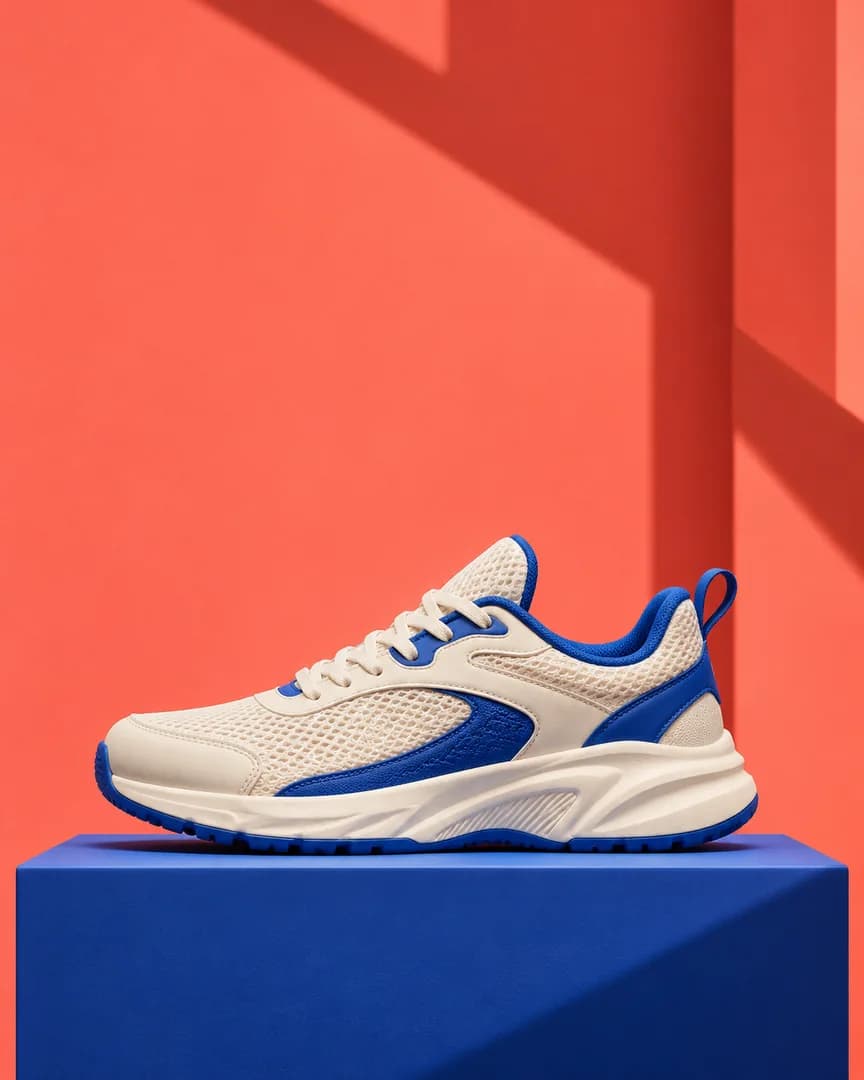
Preview square product video to 4:5 before generation and decide where the added space belongs. Expand above, below or in both directions to place the source higher, lower or centrally within the taller canvas. A sneaker on a pedestal might benefit from more space above, while a tabletop demonstration may need more of the surface below. Use square product video to 4:5 to plan the visual balance around your existing shot. The preview shows framing and source placement, while the surrounding scene is generated after you start. Compare your composition before converting square product video to 4:5, then inspect the finished movement before adding the result to your campaign.

A cream and cobalt blue sneaker on a blue geometric pedestal against a coral wall

Square product video to 4:5 with room for a message

Turn square product video to 4:5 with open background for the next stage of your design. A jewelry close-up can sit lower in the composition, leaving space above for a launch headline or an offer. Planning that room helps the product and your message stay legible together when you assemble the finished creative. Convert square product video to 4:5, download the MP4 and add precise text, logos and captions in your usual editor. AI-generated surroundings may contain imperfect lettering or details, so apply approved brand artwork during final editing. Bringing square product video to 4:5 gives you a flexible canvas for that layout and lets you review the product throughout the sequence.

An emerald and gold ring on dark green velvet with open space above for a later headline

Give your existing demonstration another place to play

Bring square product video to 4:5 when a finished demonstration needs a portrait version for a new placement. Keep the original sequence and duration, including source audio when present. A coffee preparation clip can carry its familiar pour, narration or soundtrack into the taller composition, giving the next edit a useful starting point. Taking square product video to 4:5 helps you reuse footage from a previous shoot for a product feed, seasonal promotion or shop update. Download the finished MP4 and review picture, sound and generated boundaries from beginning to end. Convert square product video to 4:5 for the placement you need, then finish your captions and campaign details in your editor.

A glass coffee dripper, gooseneck kettle and cup arranged for a brewing demonstration

How to convert square product video to 4:5

  1. 1. Upload your square clip

    Select a playable 1:1 clip with a clear product and visible surroundings to preview taking square product video to 4:5.

  2. 2. Preview the portrait frame

    Set square product video to 4:5, choose expansion direction and check placement. Add an optional scene description and review estimated credits.

  3. 3. Generate and download

    Generate square product video to 4:5, review the added scene and audio, then download the MP4 for your final edit.

Where a 4:5 product video fits

Product feed posts

Convert square product video to 4:5 for a taller feed composition that keeps your collection or demonstration together.

Campaign creative

Take square product video to 4:5 for a portrait campaign placement. Add current offers and approved branding after downloading.

Shop and launch updates

Bring square product video to 4:5 when reusing a packaging reveal, making process or seasonal demonstration in a new layout.

A clear path from source clip to portrait result

  • Frame it before generation

    Preview square product video to 4:5 with source placement and expansion controls before spending credits on the result.

  • Know the estimated cost

    Check the duration-based credit estimate before converting square product video to 4:5. Monthly and yearly plans provide additional credits.

  • Return to the finished task

    Processing continues after you leave. Check progress and download available results from your account for 30 days.

Square product video to 4:5 FAQ

How do I convert square product video to 4:5?

Select your square clip and choose 4:5. Preview expansion above, below or both and check estimated credits, then generate, review the new surroundings and download the MP4. An optional prompt can describe the environment you want AI to extend.

Will square product video to 4:5 crop or stretch my product?

Taking square product video to 4:5 keeps the complete source composition visible with its proportions retained. AI adds surroundings around that picture. Output resolution can change, so review small packaging text, existing captions and product details at the final viewing size. Newly generated scenery should also be checked through the whole clip.

What resolution can square product video to 4:5 export?

Export square product video to 4:5 at up to 1080 × 1350 pixels. Actual dimensions depend on source resolution, and smaller inputs can produce smaller results. A 1:1 source such as 1080 × 1080 gains a taller canvas. Download the result as an MP4 for editing or publishing.

Is square product video to 4:5 suitable for Reels too?

Use 4:5 when your intended placement calls for a portrait feed format. Choose 9:16 in the tool when you need a taller full-screen composition. Check the current requirements of your destination and the final placement preview before publishing, especially when adding captions or campaign graphics.

Can I control the background and add exact brand text?

Use an optional scene description to guide square product video to 4:5 generation. Existing branding remains inside the source picture. AI-generated extensions may contain inaccurate lettering or logos. Add exact headlines, prices, legal copy and approved artwork after downloading, using your usual editing tools.

Which square product video to 4:5 uploads are supported?

Upload a playable MP4, MOV, WebM or MKV up to 180 seconds and 300 MB. Your result retains the source duration and includes source audio when present. Clear products, stable lighting and controlled movement provide useful context. Review fast motion and complex backgrounds carefully.

Can I try square product video to 4:5 for free?

Try one clip up to 10 seconds free with no account required. Generation costs 1 credit per second. Check the estimate before starting. Monthly and yearly subscriptions provide more credits for additional product clips.

Can I leave and download my 4:5 result later?

Yes. Start square product video to 4:5 generation and return to your account to check progress or download an available result. Files and results remain available for 30 days. Each account allows one pending or processing task, so finish that task before starting another conversion.

Take your square product video to 4:5

Convert square product video to 4:5 with the complete source in view. Preview your portrait composition and give your next product story room to unfold.

Expand my product video